An AI note taker records or ingests your words, transcribes them, and then uses AI to produce clean, organized notes — a real title, a summary, and structure instead of a wall of raw text. The best ones go further: they file each note automatically and make everything searchable, so capturing a thought and organizing it become one step instead of two.
Transcription vs. structuring: two generations of tools
The first generation of voice tools solved transcription — turning speech into words. That was genuinely hard, and it's now genuinely commoditized. Any dictation app can do it. The result is accurate and exhausting: a transcript reads exactly the way you talk, complete with false starts, filler, and three versions of the same sentence. Nobody re-reads a transcript for fun.
The second generation solves structuring — figuring out what you meant and writing it down properly. Instead of handing you your own words back, an AI note taker rewrites them: it names the note, summarizes it, and organizes the content into sections that match what kind of thought it was. That's the difference between a recording of your thinking and a usable record of it.
The practical test is simple. Open a note from three weeks ago. If you have to read the whole thing to know what it says, you have a transcriber. If you can skim a title and summary in five seconds, you have an AI note taker.
What an AI note taker should actually do
Strip away the marketing and the job description has five lines:
- Write a real title. Not a timestamp, not the first five words you happened to say — a title that tells you what the note is about.
- Summarize. A few lines you can skim to decide whether you need the rest.
- Structure the content. A wall of paragraphs is barely better than a transcript. Good output has sections, lists, and shape that matches the material.
- File the note automatically. Categorization is the chore everyone skips. If the tool doesn't do it, it doesn't happen.
- Make everything searchable. Including the raw transcript — because the thing you remember saying often never made it into the clean version's title.
How Jot AI does it: the three-step loop
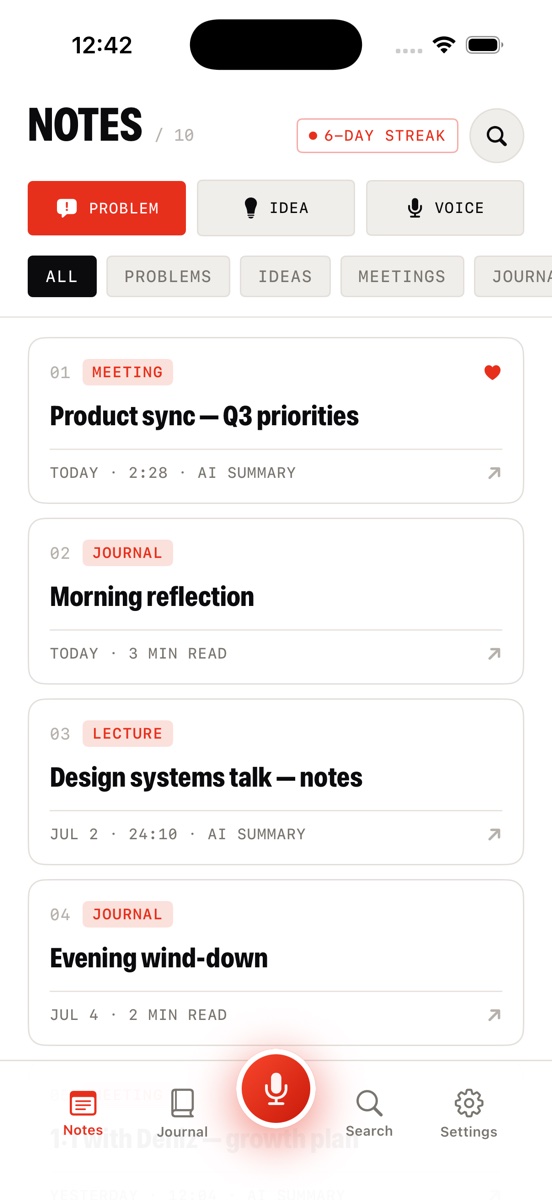
- Talk. Tap the red mic — in the app or from a home-screen widget — and speak while the live waveform confirms it's listening. Capture shortcuts let you flag a recording as a Problem, an Idea, or a plain Voice note before you even start.
- The AI structures it. Jot transcribes the recording, then rewrites it into a clean note with a title, a summary, and organized sections. A rambled dilemma comes back as a Problem doc with a status, your options, an approach, and next steps; a spark comes back as a structured Idea doc.
- It's filed. The note is auto-tagged — PROBLEM, IDEA, MEETING, LECTURE, or JOURNAL — and sorted alongside your folders, with a manual override for the rare miss. The raw transcript stays one toggle away, the audio stays attached, and everything lands in search.
What to look for when choosing one
Once several apps can clean up your speech, the differences move to the edges. Four things are worth checking before you commit your thoughts to a tool:
- The transcript stays accessible. AI rewriting is a summary of you, and summaries drop things. Jot keeps a NOTE ↔ TRANSCRIPT toggle on every note so the word-for-word record is never more than a tap away.
- The audio stays attached. When the exact wording matters, you want the source. Every Jot note carries a built-in player with ±10-second skips, so you can verify what you actually said.
- Search covers transcripts. If search only reads the polished note, half your words are invisible. Jot's global search runs across notes, transcripts, and journal entries.
- The categories match how you think. Generic folders describe where a note lives; good categories describe what it is. Problems, ideas, meetings, lectures, and journal entries are different kinds of thoughts — and your tool should know the difference, while still letting you override it.
If you want the mechanics of the capture side — how a spoken ramble becomes clean text step by step — see our guide to turning voice notes into text.
Try a real one
Download Jot AI free, talk through whatever's in your head, and watch it come back as a titled, structured, filed note.
Download on the App Store