The sustainable way to organize voice memos is automatic: use an app that transcribes each memo, tags it by type, and makes every word searchable. Manual systems — renaming recordings, sorting them into folders — always decay, because they depend on you doing a chore after every capture. Organization has to happen at recording time, without you.
Why voice memos pile up unlistened
The default voice memo experience is a list of recordings named after a date or a street. There's no title that tells you what's inside, and there's no way to search the audio itself — the words you spoke are locked inside a waveform.
That leaves exactly one way to find anything: re-listening. And re-listening is brutally expensive. A four-minute memo costs four minutes to check; scanning ten of them to find one sentence costs your whole morning. So you don't. The list grows, the recordings age, and the memo you made precisely so you wouldn't lose the thought becomes the place you lost it.
The manual approach — and why it fails
The disciplined fix sounds reasonable: rename each recording right after you make it, keep a tidy folder structure, prune the old ones on Sundays. It even works — for about a week.
It fails because it bolts a chore onto a habit whose entire value is zero friction. You record voice memos because it takes one tap while walking, driving, or mid-thought. Any system that demands post-processing after each capture is competing against "I'll do it later," and "later" wins every time. Organization that depends on your discipline isn't a system; it's a resolution.
Automatic organization with Jot AI
Jot AI's answer is to make the memo organize itself the moment you stop talking:
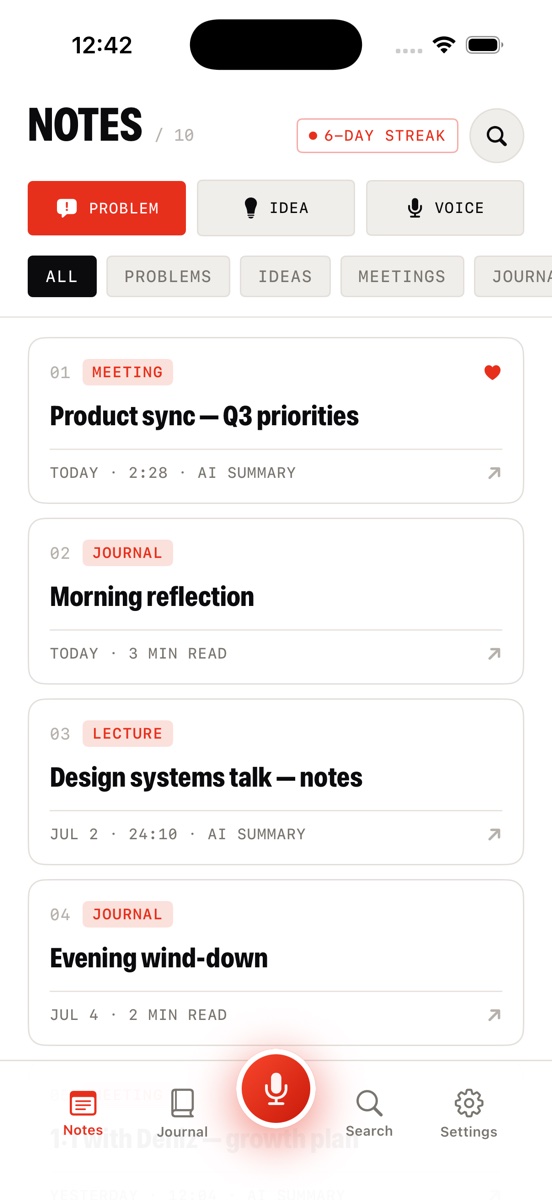
- Every recording becomes text. The audio is transcribed, then rewritten by AI into a clean note with a real title and a skimmable summary — so the list you scroll is titles, not timestamps.
- Every note is auto-tagged by type. PROBLEM, IDEA, MEETING, LECTURE, or JOURNAL — the AI reads what kind of thought it was and files it accordingly.
- Folders and manual override still exist. When the AI mislabels something, or a long-running project deserves its own home, you can re-file it yourself. Automation does the default; you handle the exceptions.
- Favorites float the keepers. The handful of notes you return to constantly don't have to fight the timeline.
- The audio never disappears. Each note keeps its recording attached with a built-in player, so the source is there when you need it.
This is the core of what separates a true AI note taker from a recorder with a transcript button: the filing is part of the capture.
Search is the real organizer
Here's the mental shift: once every memo is transcribed, you stop browsing and start asking. Jot's global search runs across notes, transcripts, and journal entries, with filter chips to narrow by type. You don't need to remember where you filed the thought about the pricing change — you type "pricing" and it surfaces, even if those words only exist in the raw transcript and never made the note's title.
Folders answer "where did I put it?" Search answers "what do I remember about it?" The second question is the one your brain actually asks, which is why search — not filing — is what finally makes a voice memo library usable.
Migrating: start fresh, forward only
Don't try to import and organize two hundred old recordings — that's exactly the backlog chore that kills the habit before it starts. Instead, draw a line: from today, every new thought goes into the organized system. If an old memo still matters, you'll know which one it is — re-listen to that one recording and talk it back in as a fresh note. The rest were already lost; now they're just honest about it.
Stop archiving. Start finding.
Download Jot AI free and record one memo — it comes back titled, tagged, summarized, and searchable.
Download on the App Store