To turn voice notes into text: record your thought in an AI voice notes app, and it transcribes the audio automatically. Jot AI then goes a step further — it rewrites the raw transcript into a clean note with a title, summary, and structure, and files it under Problems, Ideas, Meetings, Lectures, or Journal.
Why raw transcription isn't enough
Any dictation tool can turn speech into words. The problem is what those words look like: one giant paragraph of "um, so, basically, the thing is…" — accurate, and useless. You won't re-read it, you can't skim it, and three weeks later you can't find it.
Turning voice notes into text people actually use takes three layers: transcription (what you said), structuring (what you meant), and filing (where it belongs). Most apps stop at layer one.
Step by step: voice note → clean text with Jot AI
- Tap the red mic. From the app or the home-screen widget — capture starts in one tap, with a live waveform so you know it's listening.
- Talk like a human. Don't dictate punctuation or plan sentences. Ramble, backtrack, think out loud — messy input is expected.
- Stop, and let the AI work. Jot transcribes the recording, then rewrites it into a readable note: a title, a summary, and structured sections instead of a wall of words.
- Check the transcript when it matters. Every note keeps a NOTE ↔ TRANSCRIPT toggle — the clean version for daily use, the word-for-word record when you need the source. The audio stays attached, with a player right on the note.
- Let it file itself. The note is auto-tagged — Problem, Idea, Meeting, Lecture, or Journal — and becomes searchable along with its transcript.
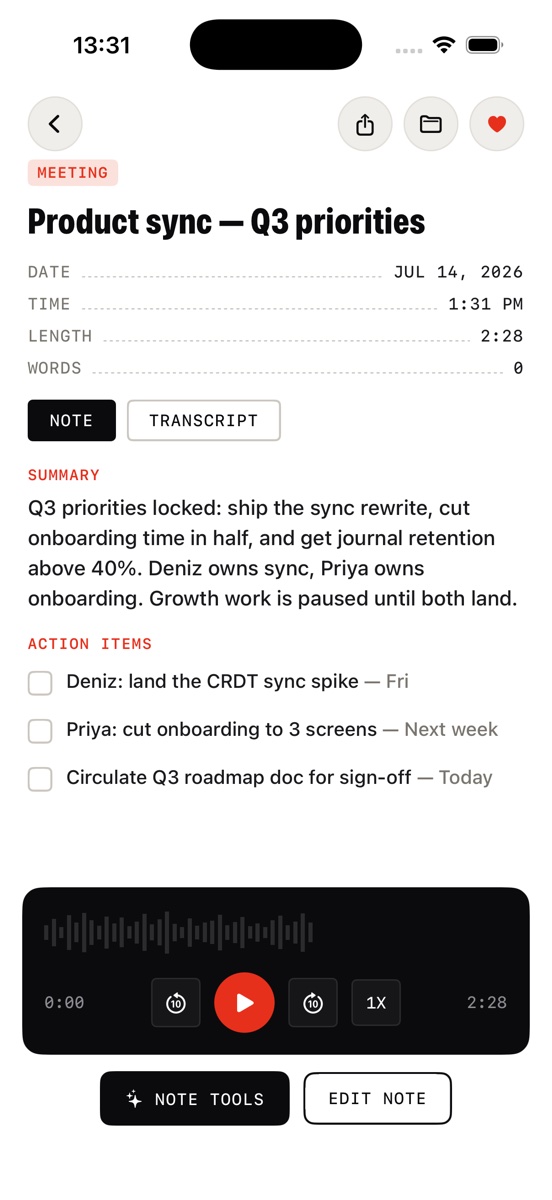
What good voice-to-text output looks like
- A real title, not the first five words of the recording.
- A summary you can skim in five seconds to decide if you need the rest.
- Structure that matches the content — a problem gets options and next steps; a meeting gets what was decided; a journal entry reads like a journal entry.
- Search that includes the transcript, so "that thing I said about the sync layer" is findable even if the note title never mentions it.
When to use voice notes instead of typing
Voice wins whenever your hands or eyes are busy, or the thought is bigger than a sentence: walking, driving, right after a meeting, mid-shower-thought, or while the idea is still hot. Typing wins for precision edits — which is why Jot gives you a full editor on every note after the AI does the first draft.
Stop transcribing. Start filing.
Download Jot AI free, record one rambling thought, and see it come back as a clean, filed, searchable note.
Download on the App Store