To get AI meeting notes or lecture notes: record the session where you're permitted to, and let an AI note taker transcribe it and produce a structured summary. Jot AI tags the note MEETING or LECTURE automatically, keeps the word-for-word transcript one toggle away, and makes both searchable — so nothing said in the room is lost.
Why typed notes fail in meetings and lectures
Typing while someone talks splits your attention in half, and both halves lose. While you're capturing the sentence from ten seconds ago, you're missing the one being said now — so your notes end up biased toward whatever you could keep up with, not whatever mattered. You leave the room with fragments: half an action item, a phrase with no context, a bullet you won't understand by Friday.
Lectures make it worse. The material is denser, the pace isn't yours, and the moment you stop to actually think about a point — the whole reason you're there — you fall behind on the record. The listener and the stenographer are two different jobs, and you've been trying to do both.
The record-first workflow
The fix is to separate the jobs: you listen, the recording remembers. In practice:
- Get the OK first. Ask the room, or the professor — more on etiquette below.
- Start recording in one tap. Hit the red mic in Jot AI — or the home-screen widget — and put the phone down. The live waveform confirms it's capturing; you're done touching it.
- Actually participate. Ask questions, push back, think. If something strikes you, jot a word on paper — a pointer, not a transcript. The full record is already being kept.
- Say your takeaways out loud at the end. Before you stop, spend thirty seconds summarizing what you'll do next. Your own conclusions land in the recording alongside everything else.
What the AI gives you after
When you stop recording, Jot AI transcribes the audio and rewrites it into a note you'd actually re-read:
- A titled, summarized, structured note. Not forty minutes of prose — a real title, a skimmable summary, and organized sections.
- The word-for-word transcript, one toggle away. The NOTE ↔ TRANSCRIPT switch keeps the raw record intact for when the exact phrasing matters.
- Audio replay for exact quotes. Every note carries a built-in player with ±10-second skips — when someone disputes what was agreed, you can jump to the moment and hear it.
- Automatic filing. The note is tagged MEETING or LECTURE on its own and sorted with your folders, with manual override if you'd file it differently.
What makes this work is the structuring layer, not the recording — the same thing that separates an AI note taker from a dictation app.
Staying findable later
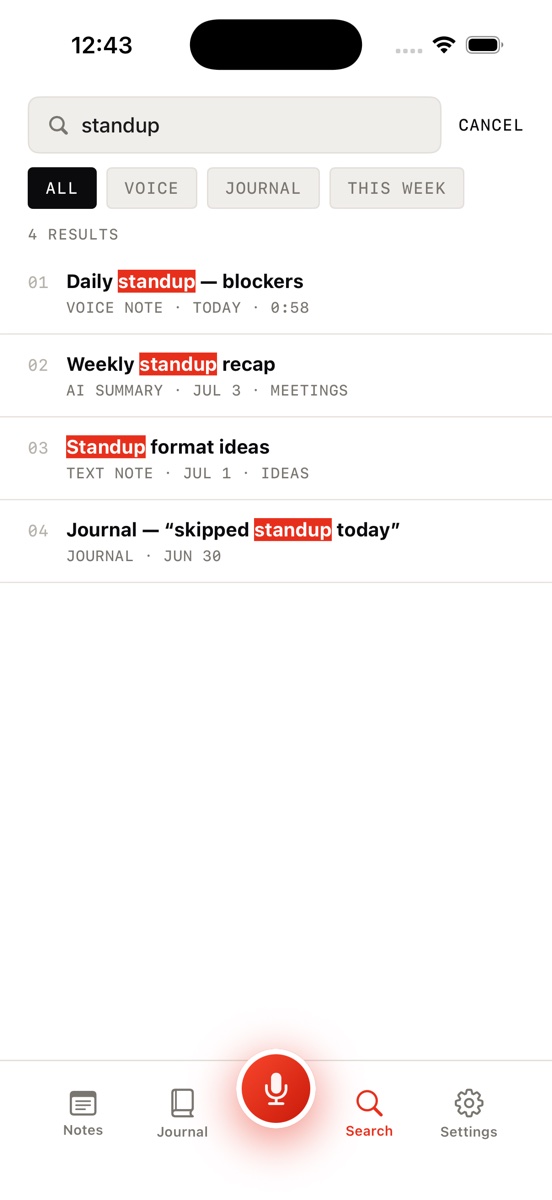
The real payoff shows up weeks later. Jot's global search runs across notes and their transcripts (and journal entries), with filter chips to narrow by type. That means you search for what you remember hearing, not for whatever the note happens to be titled: the budget figure someone mentioned in passing, the paper the professor recommended off-hand, the name of the vendor from the standup. If it was said, it's findable — even if it never made the summary.
A note on recording other people
Always ask before you record. Consent laws vary by state and country — some require every participant's consent — and many workplaces and universities have their own recording policies, so check yours. In practice, permission is rarely a problem if you're direct about the purpose: "Mind if I record this so I can stay off my laptop and actually listen?" Most people prefer a colleague who's present over one who's typing. And keep recordings for your own notes — they're a memory aid, not something to pass around.
Be in the room. Keep the record.
Download Jot AI free, record your next meeting or lecture, and get back a structured note with every word still searchable.
Download on the App Store