The fastest brain dump is spoken, not written. Tap record in Jot AI, say everything on your mind — unfiltered, out of order, half-finished — and stop. The AI transcribes it and organizes it into clean, titled, tagged notes afterward, so you never have to structure your thoughts while you're still having them.
What a brain dump is — and why it works
A brain dump is exactly what it sounds like: you take everything circulating in your head — tasks, worries, half-decisions, ideas you're scared of losing — and put it somewhere outside your head, all at once, without sorting it.
It works because working memory is tiny. Every open loop you're carrying — "email the landlord," "that thing Sam said," "what if we changed the pricing" — takes up a slot, and your brain keeps re-rehearsing each one so you don't lose it. That background rehearsal is the mental static you feel at the end of a long day. Externalize the loops and the rehearsal stops. The relief is almost physical, and it arrives the moment the thoughts land somewhere you trust.
Why written brain dumps stall
If brain dumps are so effective, why does everyone abandon them? Because writing is a bottleneck in three ways:
- Typing is slower than thinking. You think at roughly speaking speed. While you type thought one, thoughts two through five are queuing — and evaporating.
- Blank-page friction. Open the app, make a new doc, decide where this goes, stare at the cursor. Every step is a chance for the impulse to pass.
- You self-edit. The moment words appear on a screen, you start fixing them. Dumping quietly turns into drafting, and drafting is work — so you stop doing it.
The voice brain dump method: five minutes, four rules
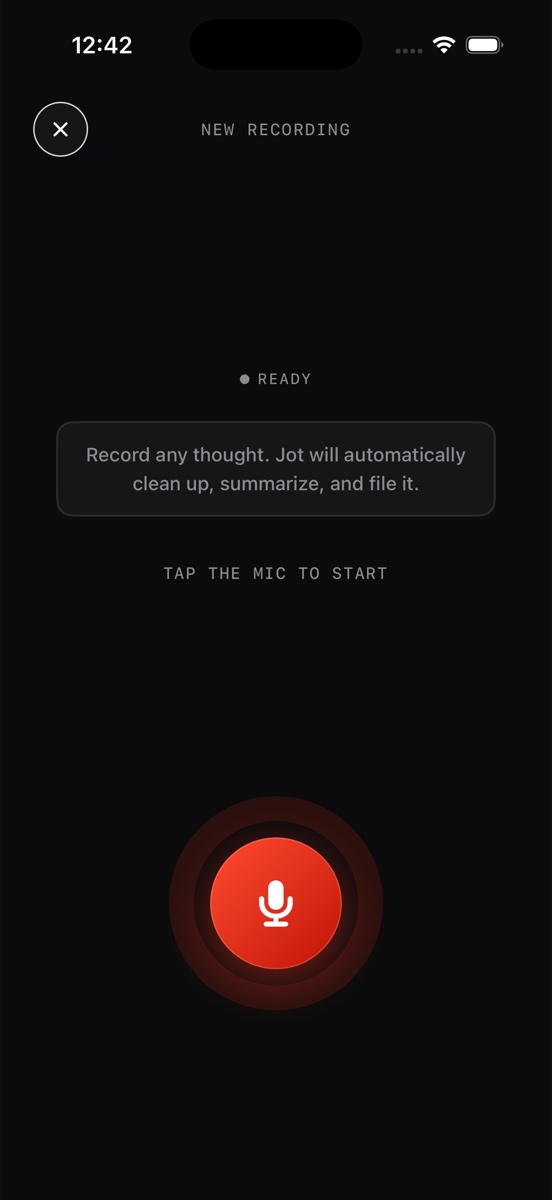
- Record. One tap on the red mic — from the app or a home-screen widget, so there's nothing between the urge and the recording. The live waveform confirms it's listening.
- Ramble. Say whatever surfaces, in whatever order it surfaces. Jump between the grocery list and the business idea mid-sentence. Repeat yourself. Trail off.
- Don't organize. No headings, no priorities, no "okay, category two: work stuff." If you catch yourself tidying, that's the writing reflex sneaking back in — just keep talking instead.
- Stop. When you run dry, ask yourself "what else?" once, wait a beat, then hit stop. Five minutes is usually plenty; a real overload might take ten.
Why this fits ADHD brains
If you have ADHD, none of this is a workaround — it's a better fit for how your brain already operates. Three reasons:
Zero-friction capture. The gap between "I should note this" and actually noting it is where thoughts get lost to the next distraction. One tap closes that gap before anything can jump in.
No structure demanded up front. Traditional systems ask you to categorize while you capture — which is exactly the executive-function tax that makes them collapse. A voice dump asks for nothing but talking.
The app does the executive function afterward. Writing the title, summarizing, tagging, filing — the boring organizational labor that ADHD brains famously defer — happens automatically, after you've stopped. You do the interesting part; Jot does the admin.
What happens in Jot after you stop
This is where a voice brain dump beats a voice memo. The recording is transcribed, then the AI rewrites the ramble into a clean note — a real title, a skimmable summary, structured sections instead of a wall of words. The note is auto-tagged as a Problem, Idea, Meeting, Lecture, or Journal entry, so the pieces of your dump file themselves.
Nothing is lost in the cleanup: every note keeps a NOTE ↔ TRANSCRIPT toggle for the word-for-word version, the audio stays attached with a player on the note, and everything — notes and transcripts alike — is searchable later. You can dump recklessly precisely because retrieval is handled.
Turning a dump into action
An unprocessed brain dump just relocates the pile. Jot processes it: when part of your ramble is a problem you're chewing on, it comes back as a Problem doc — status, options, an approach, and next steps, structured by AI from your voice note. A stray idea comes back as an Idea doc you can actually evaluate later. The dump empties your head and leaves you with something to act on — which is the whole point.
Empty your head in five minutes
Download Jot AI free, hit the red mic, and say everything. It comes back organized.
Download on the App Store