To capture ideas before you forget them: make capture faster than forgetting. Ideas decay in seconds, so the moment one appears, tap once, speak it out loud, and let AI title it, structure it, and file it. Never trust "I'll remember it" — you won't.
Why good ideas evaporate
An idea isn't a file saved to disk — it's a fragile state in working memory. The moment something else demands your attention, the state collapses. One notification, one "sorry, what were you saying?", one red light turning green, and the idea is overwritten by whatever came next.
That's why the window matters. You have roughly the first thirty seconds while the idea is vivid: you can still feel its shape, why it's good, what it connects to. After a context switch you're left with a residue — "I had a great idea about onboarding… something about the first screen?" — which is not an idea. It's the memory of having had one.
The fix isn't a better memory. It's a system that gets the idea out of your head before the window closes.
The capture-friction rule
Here's the rule that decides whether your system works: every extra tap between "idea" and "recorded" loses ideas. Unlock the phone, find the app, open a new note, name it, pick a folder — each step is a chance for the thought to die or for you to decide it's not worth the hassle.
Jot AI is built around collapsing that path. A home-screen widget starts a recording instantly, and inside the app the big red mic is one tap — with a live waveform so you know it's listening from the first word. Idea to capture in under two seconds, which is faster than forgetting.
Speak it — don't type it
Typing on the go is where ideas go to shrink. Standing on a sidewalk thumbing a note, you compress a rich thought into four words — "onboarding — skip email??" — and three days later those four words mean nothing.
Spoken, the same idea comes out as a full paragraph: what triggered it, why it matters, what you'd try first, what might break. You talk far faster than you type, so there's no pressure to compress. An idea is a paragraph when spoken and a lost fragment when typed on the go — so speak it, mess and all.
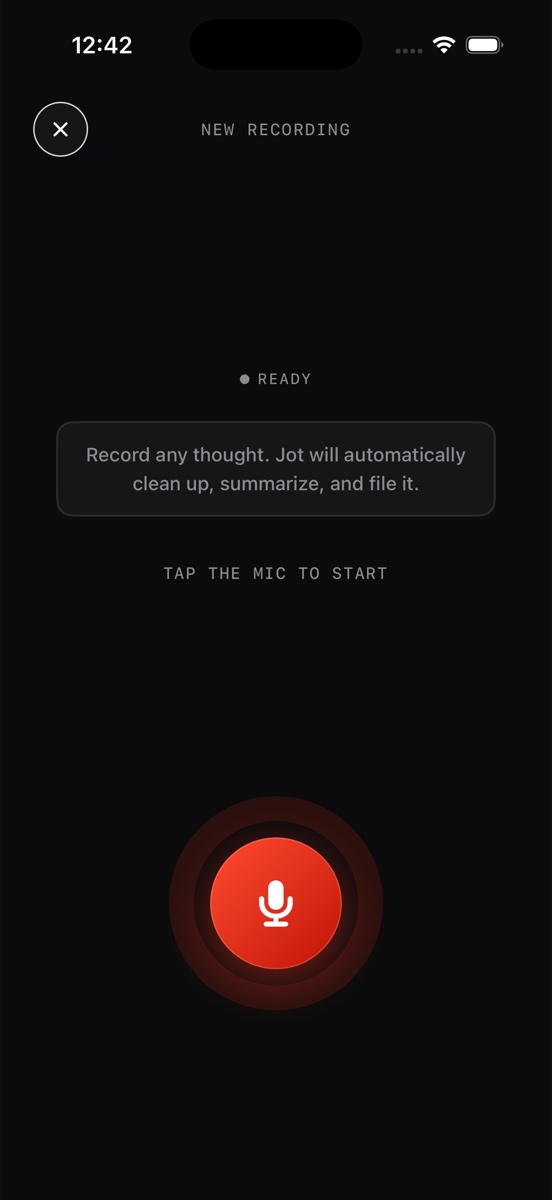
What happens after you capture in Jot
Speed of capture only solves half the problem. A voice memo app gives you "New Recording 47" — captured, technically, but buried. Jot treats the recording as raw material:
- It's transcribed automatically, so the idea exists as text, not just audio.
- The ramble becomes a titled Idea doc — the AI writes a real title, a summary, and structured sections out of your spoken run-on sentences.
- It's auto-tagged IDEA and filed, so it lands next to your other ideas instead of in a chronological pile of recordings.
- The raw material stays attached — a NOTE ↔ TRANSCRIPT toggle keeps your exact words, and the audio player keeps your exact voice.
The result: thirty seconds of talking becomes a document you can actually revisit, not a memo you'll never replay.
Building the capture habit
A capture system only compounds if you use it reflexively. Three things in Jot make the reflex stick:
- Lower the trigger threshold. The home screen gives you dedicated capture shortcuts — Problem, Idea, and Voice — so starting the right kind of note is one deliberate tap, not a decision.
- Keep the streak alive. Jot shows your day streak right at the top of your notes. It's a small nudge, but "don't break the chain" is one of the oldest habit tricks because it works.
- Trust the system. Once you've seen a few rambles come back as clean, filed docs, your brain stops arguing "it's not worth recording." That trust is the habit.
Reviewing your idea bank
Captured ideas are an asset only if you can get back to them. Because every capture in Jot ends up tagged and transcribed, review is trivial: filter by the IDEA tag to browse everything you've banked, or use global search — which looks across notes, transcripts, and journal entries — to find "that pricing idea" even if the word "pricing" only ever left your mouth, never your keyboard. Skim titles, favorite the keepers, and archive the rest. Ten minutes a week turns a pile of captures into a pipeline.
Your next good idea is coming. Be ready.
Download Jot AI free, put the widget on your home screen, and capture the next idea in the time it takes to lose one.
Download on the App Store